


PheedLoop Go!
4.423.00 Reviews
App Specs
- Version
- 3.85.3
- Updated On
- License
- Free
- Downloads
- 100,000+
- Developer
- PheedLoop
- Categories
- Events
- Platform
- Android
Screenshots

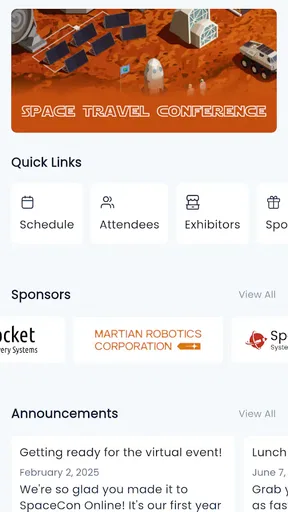
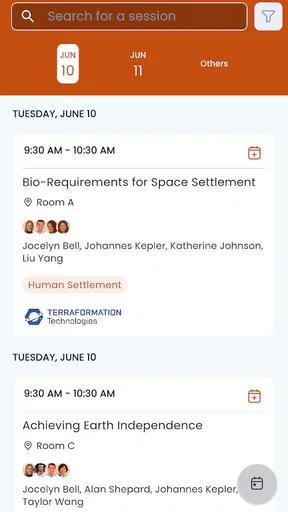
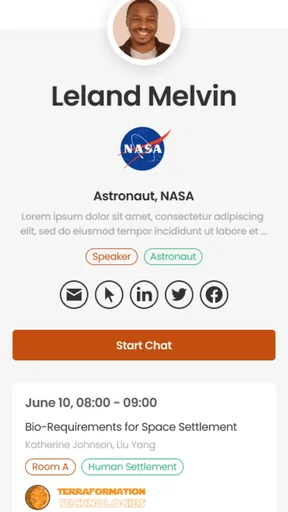
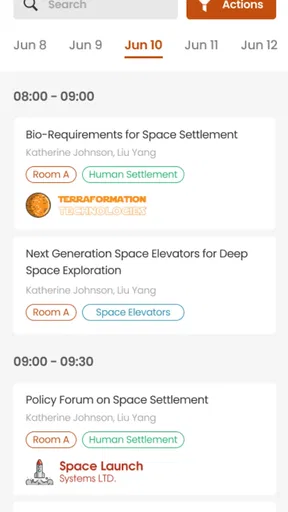

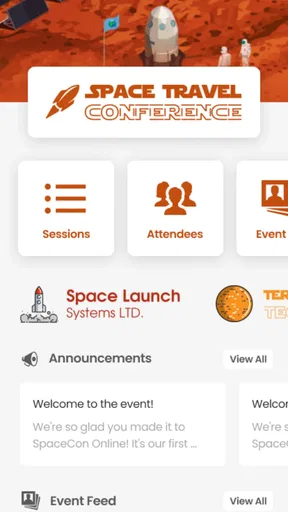
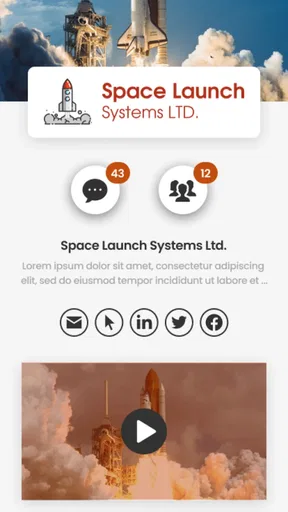
 Analysis by AppCompare
Whether an event app is worth installing depends on one detail people often discover too late: the organizer has to use the platform behind it. PheedLoop Go! is built for events powered by PheedLoop, so it is not a general-purpose calendar or a way to browse every conference. When it is the app for your event, though, it can bring schedules, event information, and attendee activity into one place. I’d treat it as a companion for a specific event rather than something to keep on my phone for everyday planning.
What free access means in practice
The app is free, which makes trying it a low-commitment choice if an organizer directs you to it. There is no purchase decision to make before you can use it; the more useful question is whether your event is actually running on PheedLoop. Its developer is PheedLoop, and the app is in the Events category. For an attendee, the practical value comes from having a single event-specific place to check rather than from paying for a general event discovery service.
That distinction matters when comparing it with ticketing apps, social calendars, or a conference website saved to your browser. Those options may help you find or register for an event, but they do not necessarily serve as the event’s own attendee hub. Conversely, if your organizer already provides a clear mobile schedule and you only need to check one session time, a browser bookmark or your phone’s calendar may be simpler. I would install this when the event expects attendees to use it, not just because it is free.
Getting Started with PheedLoop Go!
First off, installing PheedLoop Go! was a breeze. Available on both Android and iOS, the app's download and setup process is quick, getting you into the action without any hassle. Once you're in, the interface is clean and intuitive. It's like the developers knew exactly what we needed and delivered it with a bow on top.
Making the event information useful
Event apps are most helpful when they reduce small decisions during a busy day. Before arriving, I’d use the schedule to spot overlapping sessions and choose what matters most, rather than deciding in a crowded hallway. If a map is available for that event, I’d check where a room or exhibitor is before setting off. This is a practical workflow, not a promise that every event will have the same content: what appears depends on the event and the organizer’s setup.
A useful habit is to check the app again after you arrive, even if you planned your day in advance. Event details can be adjusted, and an attendee app is more valuable when it reflects the organizer’s current information. I’d still keep the venue name and any essential arrival details somewhere easy to reach; relying on one app for every logistical detail can be awkward if you have limited connectivity or your phone battery is running low.
Key Features
The app is packed with features, but a few stand out. One of the coolest things is the interactive event map. No more wandering around like a lost puppy; you can easily find your way to different sessions, exhibitors, and even the food court (because, let's be honest, that's a priority).
Worth Reading Before You Choose

EA SPORTS FC Mobile 26 Is a Bigger Football Game, but It Takes Time

Flipboard Shows What News Apps Must Do Beyond the Feed

Switching to Android Auto Means Rethinking Your Driving Routine

Google Calendar Makes a Crowded Week Easier to Manage

Ludo King Makes the Most of the Minutes Between Plans

Baby Panda World Brings Quick Play to Modern Phones, but Its Game Library Feels Busy
Another feature I loved is the real-time schedule updates. Ever had an event schedule change last minute? With PheedLoop Go!, you get instant notifications so you're always in the loop. Plus, you can customize your own schedule, which is a lifesaver for those of us who like to plan our day down to the minute.
When a schedule is crowded, I find it more useful to choose a few priorities than to save every possible session. That makes a personal plan easier to scan and leaves room for a spontaneous conversation or a break. I would also check the event’s schedule shortly before traveling rather than assuming that a plan made days earlier is final. The app can help organize choices, but it cannot make two overlapping talks attendable at once.
A realistic day with the app
Imagine arriving at a trade show with a short list of exhibitors to visit and two talks you do not want to miss. I’d use the schedule to anchor the talks first, then use the map to orient myself and fit exhibitor visits around them. If a session moves or I discover a useful alternative, I can adjust the rest of the day instead of repeatedly searching through emails or printed pages. That is where an event-specific app can earn its place: it helps connect the plan to the venue and the people attending.
There is a trade-off, though. A printed program is easy to glance at without unlocking a phone, and a paper note can be a dependable backup when the device is out of battery. I would not discard those options if the event is important or the schedule is dense. For a quick visit with only one appointment, the app may be more tool than I need; for a full day with room changes and several priorities, keeping the event details together is more compelling.
Networking Made Easy
Networking is a huge part of any event, and this app makes it super easy. The attendee matchmaking feature connects you with people who have similar interests. It’s like Tinder for professionals, minus the awkward small talk. You can set meetings, chat with other attendees, and even share digital business cards. No more fumbling with paper cards that you’ll probably lose anyway.
For a first-time attendee, the less obvious benefit of digital networking is having a way to follow up with context. If you meet someone after a talk, a note about what you discussed can make a later message feel more natural than a stack of names collected without reminders. I would still treat matchmaking as an introduction, not proof that someone will be a useful contact. A good conversation depends on the people and the event, and it is perfectly reasonable to use the app for logistics while skipping its social side.
It is also worth deciding how much networking you actually want before the event starts. If your goal is to meet a particular kind of professional, spend a moment shaping your profile or interests if those options are presented for the event, then use suggested connections selectively rather than trying to contact everyone. If you prefer spontaneous conversations or do not want to manage another messaging space, face-to-face introductions and exchanging details in your usual way may suit you better.
Engagement on Another Level
Let’s talk engagement. PheedLoop Go! offers live polls and Q&A sessions during events, which is a fantastic way to get involved and have your voice heard. Plus, the app supports gamification. Who doesn’t love a little friendly competition? Earn points for participating and see your name climb the leaderboard. It’s a fun way to stay engaged and maybe even win some cool prizes.
Interactive tools work best when they support the session rather than compete with it. I’d use a poll to register an opinion quickly or submit a question while the topic is fresh, then put the phone away and listen. If an event includes a leaderboard, I’d see it as optional fun, not a reason to chase every activity. That keeps the app useful for participation without turning a talk into a constant screen-checking exercise.
Watching and catching up
The app isn’t just about attending; it’s about experiencing. With video streaming and on-demand content, you can catch sessions you missed or rewatch your favorites. It’s like having a personal event DVR. This feature is especially handy if you’re attending a multi-day event and need a quick refresher.
For someone choosing between sessions that overlap, access to recordings can change the decision: I would attend the session where being present matters most and plan to revisit the other if it is made available. That is a useful possibility, not something I would assume for every event. If watching later is important to you, check the event’s own guidance in the app before building your schedule around recordings. On-demand material is most valuable when it fits a specific learning need, such as reviewing a key explanation before applying it at work.
User Experience
Using PheedLoop Go! felt incredibly user-friendly. The navigation is straightforward, and everything is where you’d expect it to be. I didn’t experience any lag or crashes, which is a huge win in my book. The app’s design is sleek and modern, making it visually appealing as well.
That ease matters most when you are using the app in short bursts: checking a room, confirming a time, or looking for the next item between conversations. It is a different kind of convenience from a broad event-discovery service, which is designed to help you decide what to attend in the first place. This app’s strength is tied to the event you are already attending, so I would not choose it as a replacement for a general calendar or a way to compare conferences.
The support within the app is also noteworthy. If you run into any issues, there's a help section that guides you through common problems. Plus, the customer support team is just a tap away, and they're surprisingly quick to respond.
One practical question is whether it can serve as the only place to keep essential event information. I would use it as the main reference for the event content it provides, but keep key travel or access details in a separate place as well. Another is whether it makes sense to install before registration: I would follow the organizer’s instructions, because the app’s usefulness depends on the event being set up for it and on having the relevant event details available to you.
Who gets the most value
I’d recommend it most to attendees at a PheedLoop-powered conference, trade show, or similar gathering who expect to move between sessions, follow event updates, or make professional connections. It may be especially useful if you are new to the venue or attending alone: having the event schedule and attendee tools in one event-focused place can make it easier to decide what to do next. Its broad reach is reflected in over a hundred thousand installs, while its average rating is 4.4 from around two hundred ratings. Those figures suggest that many people have found a reason to use it, but they do not tell me whether a particular event has configured the parts you care about.
I would skip it if your event is not powered by PheedLoop, if you only need a single appointment reminder, or if you strongly prefer not to use a phone during an event. A calendar app is better for recurring personal commitments; a printed program can be better for quick reference; and an event website may be enough when you only need public information. The right choice depends less on which app has the longest feature list and more on how your organizer communicates.
Version, compatibility, and audience
The current version is 3.85.3, and it requires Android 8.0 or later. Its content rating is Everyone, so it is presented as suitable for a general audience. Released on May 7, 2021, it has had time to become an established option for events using the platform. I would still check that your own device meets the minimum requirement and that the event has shared instructions for joining before you rely on it on the day.
The app’s free access is a straightforward advantage, but it should not be confused with a guarantee that every event feature or session is available to every attendee. What matters to your experience is the event’s configuration and the information the organizer makes available. If you are deciding between this and a simpler alternative, ask yourself whether you need more than a static schedule: maps, participation, networking, or session content can justify an event app, while a short visit may not.
Final Thoughts
Overall, PheedLoop Go! is a game-changer for event-goers. It takes the stress out of navigating large events and adds layers of engagement and networking opportunities that are invaluable. Whether you're a first-time attendee or a seasoned pro, this app will enhance your experience and make attending events more enjoyable and efficient.
If you’re planning on hitting up any conferences or trade shows soon, do yourself a favor and download PheedLoop Go!. You’ll wonder how you ever managed without it.
Pros
- User-friendly interface for easy navigation.
- Real-time updates keep attendees informed.
- Customizable branding options available.
- Seamless integration with event platforms.
- Offline access ensures functionality everywhere.
Cons
- Limited customization for smaller events.
- Occasional syncing issues with some devices.
- Chat feature could be more robust.
- Requires stable internet for full functionality.
- Initial setup may be complex for new users.
FAQs for PheedLoop Go!
What is PheedLoop Go! and what can it be used for?
PheedLoop Go! is a comprehensive event management app designed for both organizers and attendees. It facilitates seamless event coordination, including registration, scheduling, networking, and real-time updates. Users can manage their event agendas, connect with other participants, and receive notifications. It's ideal for conferences, trade shows, and corporate events.
Is PheedLoop Go! available on both Android and iOS devices?
Yes, PheedLoop Go! is available for download on both Android and iOS platforms. Users can find the app on the Google Play Store for Android devices and the Apple App Store for iOS devices. This ensures broad accessibility for users across different mobile operating systems.
How user-friendly is the interface of PheedLoop Go!?
PheedLoop Go! boasts a user-friendly interface designed to be intuitive for both event organizers and attendees. The app features easy navigation with clear icons and menus, allowing users to quickly access event information, check schedules, and engage with interactive features without a steep learning curve.
Are there any costs associated with using PheedLoop Go!?
PheedLoop Go! itself may be free to download, but usage costs can vary depending on the event. Some events might require a registration fee or offer premium features within the app for an additional charge. Always check event-specific details to understand any potential costs involved.
What kind of support is available for PheedLoop Go! users?
PheedLoop Go! offers robust customer support options, including a comprehensive help center with FAQ sections, guides, and video tutorials. Users can also reach out to the support team through email or in-app chat for direct assistance, ensuring help is readily available when needed.


